Step into any modern software development agency, and you quickly hear a distinct sound: the loud, rhythmic clacking of mechanical keyboards.
Mechanical keyboards have seen an absolute explosion in popularity among programmers over the last decade. But are they actually better than the standard membrane keyboard that came free with your computer?
How They Work
Membrane Keyboards
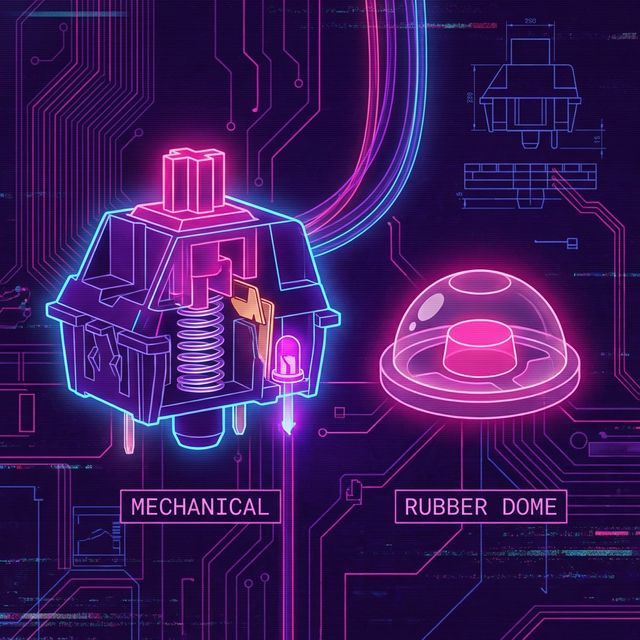
Most standard laptops and budget desktop keyboards use membrane technology. Underneath the keys lies a series of rubber domes sitting atop a flat, printed circuit membrane.
When you press a key, you are squishing the rubber dome down until it touches the circuit board, registering the keystroke.
- Pros: Cheap, highly water-resistant, ultra-quiet, and allows for very thin devices (like Apple's Magic Keyboard).
- Cons: "Mushy" feeling, requires you to "bottom out" (press the key all the way down) to register, which jolts your finger joints repeatedly.
Mechanical Keyboards
Mechanical keyboards replace the rubber dome with a dedicated, physical switch housed under every single key. These switches contain a spring and metal contacts.
- Pros: Tactile feedback, durability (50+ million keystrokes), customizable feel, and you don't have to "bottom out" to register the key.
- Cons: Expensive, bulky, and can be very loud.
Why Developers Prefer Mechanical
The primary reason programmers flock to mechanical keyboards is actuation feedback.
With a mechanical switch (specifically tactile or clicky switches, like Cherry MX Browns or Blues), you feel a distinct physical "bump" exactly when the computer registers the keypress. This happens before the key hits the bottom of the board.
For touch typists, this is revolutionary. Your brain learns exactly when to stop pressing and move to the next key. You start "floating" over the keyboard, barely pressing the keys down, resulting in:
- Faster typing speeds.
- Less jarring impact on your finger joints (reducing RSI).
- Fewer typos, as you definitively know if an adjacent key was accidentally triggered.
The Verdict
If you type 1,000 words a day responding to a few emails, a membrane keyboard is perfectly fine.
If you are a software engineer typing 15,000 words of complex, symbol-heavy syntax daily, a mechanical keyboard is a worthwhile investment in your career tooling. Pair a good mechanical board with regular accuracy training on TypeNCode, and your WPM will skyrocket.